| Halaman dalam topik: [1 2] > | Switching from Trados to CafeTran Penyiaran jaluran : Benedict Loder
|
|---|
Benedict Loder
United Kingdom
Local time: 07:27
Bahasa Jerman hingga Bahasa Inggeris
Hello,
I have been working as a freelance translator for many years and have always used Trados Studio as my CAT tool. I recently upgraded my laptop and have discovered SDL/RWS will no longer allow me to use Trados Studio 2017 on it. I find the subscription price for the new version of Trados eye-watering, so I'm intrigued by the idea of paying a one-off fee for permanent use of CafeTran.
Can anyone confirm for me that it really is possible and simple to import Trados ... See more Hello,
I have been working as a freelance translator for many years and have always used Trados Studio as my CAT tool. I recently upgraded my laptop and have discovered SDL/RWS will no longer allow me to use Trados Studio 2017 on it. I find the subscription price for the new version of Trados eye-watering, so I'm intrigued by the idea of paying a one-off fee for permanent use of CafeTran.
Can anyone confirm for me that it really is possible and simple to import Trados project packages, work on them, and export return packages in CafeTran without a lot of faff for myself or the agencies I translate for? If so it might be a worthwhile investment for me, as that's essentially all I currently do in Trados. Thanks in advance! ▲ Collapse
| | | | Taran Johnston
Amerika Syarikat
Local time: 01:27
Ahli (2024)
Bahasa Sepanyol hingga Bahasa Inggeris
+ ...
| CafeTran included in Proz.com subscription | Jun 17 |
I subscribe to Proz.com at the level that includes both CafeTran and Proz360 website hosting. Great value.
| | | | Benedict Loder
United Kingdom
Local time: 07:27
Bahasa Jerman hingga Bahasa Inggeris
TOPIC STARTER | Trados compatibility | Jun 17 |
Taran Johnston wrote:
I subscribe to Proz.com at the level that includes both CafeTran and Proz360 website hosting. Great value.
Can you confirm that CafeTran works fine with Trados packages? Thanks
| | | | | CafeTran supports SDLPPX project packages and SDLXLIFF files. | Jun 17 |
Hi, Benedict!
CafeTran is designed to support Trados project packages and, in normal workflows, translators can receive SDLPPX packages, work on them in CafeTran, and return completed SDLRPX packages to Trados users.
I have never used Trados as my main CAT tool, so there may be scenarios I've never encountered, but I've personally opened files created in Trados up to the 2017 version, and know my own exports were successfully opened in the same.
Remember ... See more Hi, Benedict!
CafeTran is designed to support Trados project packages and, in normal workflows, translators can receive SDLPPX packages, work on them in CafeTran, and return completed SDLRPX packages to Trados users.
I have never used Trados as my main CAT tool, so there may be scenarios I've never encountered, but I've personally opened files created in Trados up to the 2017 version, and know my own exports were successfully opened in the same.
Remember you can test CafeTran thoroughly with the free version! Its limit is with regards to the size of translation memories, but you can make use of all of its file-editing, importing and exporting functions without purchasing a license, to be sure it can do everything you need it to do before you go ahead and get the lifetime. You can download it here!
And, of course, as Taran says, you can opt for ProZ Premium membership with a floating CafeTran license and your own website —with hosting, email and maintenance all included. If you want to know more about that, remember you can always reach us at ProZ.com/help ▲ Collapse
| | |
|
|
|
Benedict Loder wrote:
Can anyone confirm for me that it really is possible and simple to import Trados project packages, work on them, and export return packages in CafeTran without a lot of faff for myself or the agencies I translate for?
I can. Translated thousands of Trados packages without any problem.
By the way, I use CafeTran Espresso on Mac. But there’s also a Windows and a Linux version. Tested these too, but only with a couple of projects.
Support is good.
[Edited at 2026-06-17 18:46 GMT]
| | | | Samuel Murray 
Belanda
Local time: 08:27
Ahli (2006)
Bahasa Inggeris hingga Bahasa Afrikaan
+ ...
Benedict Loder wrote:
Can you confirm that CafeTran works fine with Trados packages?
CafeTran appears to handle tracked changes from SDXLIFF files well (reading and writing). In my quick test CafeTran did not show a comment in an SDLXLIFF file (although it did add tags on either side of the word that was commented).
[Edited at 2026-06-17 21:55 GMT]
| | | | Samuel Murray
Belanda
Local time: 08:27
Ahli (2006)
Bahasa Inggeris hingga Bahasa Afrikaan
+ ...
Andrea Capuselli wrote:
And, of course, as Taran says, you can opt for ProZ Premium membership with a floating CafeTran license...
Is this still true, though? The website says that CafeTran will prompt me to log in to ProZ.com when I launch it, but it doesn't. And there doesn't seem to be any setting in CafeTran where I can specify my ProZ.com details in order the activate the licence.
| | | |
Samuel Murray wrote:
In my quick test CafeTran did not show a comment in an SDLXLIFF file (although it did add tags on either side of the word that was commented).
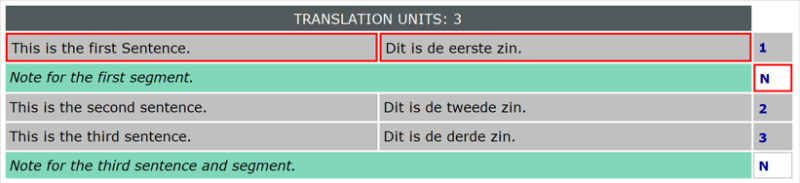
There should be a comment below the source segment in the grid.
[Edited at 2026-06-18 07:46 GMT]
| | |
|
|
|
Samuel Murray
Belanda
Local time: 08:27
Ahli (2006)
Bahasa Inggeris hingga Bahasa Afrikaan
+ ...
CafeTran Trainer wrote:
There should be a comment below the source segment in the grid.
You're right, the comment is displayed in the segment list, not in the editor pane. It's not below the source field, though -- it's on a separate line underneath both the source and target fields.
Interestingly, "Add segment note (Ctrl+N)" doesn't work on the segment with an existing comment, but it does allow me to add a note to other segments. Also, CafeTran's comment feature only allows a comment for the whole segment and not for a specific word (in Trados, the entire segment is highlighted i.e. commented). And the user ID for the added comment is "Me" when viewed in Trados (my user ID in CafeTran is "Reviewer").
Also, it took me a while to figure out but you have to press Ctrl+Enter after you add the comment, otherwise the comment is not saved in the SDLXLIFF file. If you don't press Ctrl+Enter, but move to another segment, the comment does show up in the segment list, but when you save the file and reopen it, the comment is gone. There is no visual cue telling you that a comment hasn't been saved to the file.
| | | |
Samuel Murray wrote:
Interestingly, "Add segment note (Ctrl+N)" doesn't work on the segment with an existing comment, but it does allow me to add a note to other segments. Also, CafeTran's comment feature only allows a comment for the whole segment and not for a specific word (in Trados, the entire segment is highlighted i.e. commented). And the user ID for the added comment is "Me" when viewed in Trados (my user ID in CafeTran is "Reviewer").
Also, it took me a while to figure out but you have to press Ctrl+Enter after you add the comment, otherwise the comment is not saved in the SDLXLIFF file. If you don't press Ctrl+Enter, but move to another segment, the comment does show up in the segment list, but when you save the file and reopen it, the comment is gone. There is no visual cue telling you that a comment hasn't been saved to the file.
I created a ticket for this.
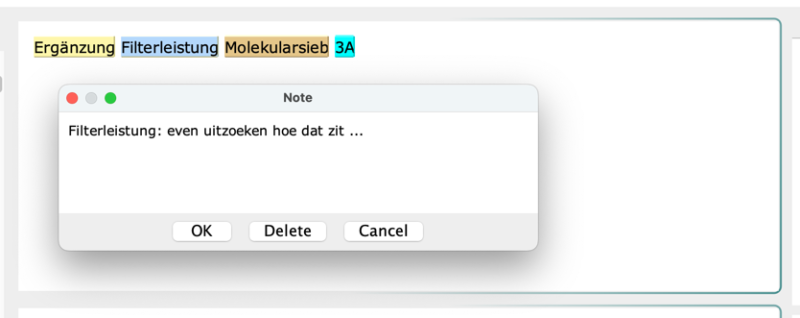
Note that when you have selected a word in the source segment before you add a comment, this word is inserted in the comment pane:
| | | | Benedict Loder
United Kingdom
Local time: 07:27
Bahasa Jerman hingga Bahasa Inggeris
TOPIC STARTER
Thank you all for the confirmation and the additional information! I'll give it a go and see how I get on - the tips regarding posting comments are very useful as well, thank you.
| | | | | CafeTran / ProZ login | Jun 18 |
Samuel Murray wrote:
The website says that CafeTran will prompt me to log in to ProZ.com when I launch it, but it doesn't. And there doesn't seem to be any setting in CafeTran where I can specify my ProZ.com details in order the activate the licence.
Thanks for catching this, Samuel! I'll log a request to update that wording, because I believe that behavior has changed with recent updates. Please check the "ProZ.com services" box in the "Other resources and services" panel in CafeTran's dashboard, the login page should appear to allow you to enter your ProZ credentials.
| | |
|
|
|
Samuel Murray
Belanda
Local time: 08:27
Ahli (2006)
Bahasa Inggeris hingga Bahasa Afrikaan
+ ...
Andrea Capuselli wrote:
Please check the "ProZ.com services" box in the "Other resources and services" panel in CafeTran's dashboard, the login page should appear to allow you to enter your ProZ credentials.
You're right, that works, thanks.
It didn't occur to me that that would be the way of licensing CafeTran. The checkbox in question relates to using ProZ.com glossaries, and not to licensing CafeTran. I'm guessing this means that one can't use one's CafeTran licence without giving CafeTran access to one's glossaries on ProZ.com (which isn't a problem for me personally).
| | | |
Samuel Murray wrote:
Andrea Capuselli wrote:
Please check the "ProZ.com services" box in the "Other resources and services" panel in CafeTran's dashboard, the login page should appear to allow you to enter your ProZ credentials.
You're right, that works, thanks.
It didn't occur to me that that would be the way of licensing CafeTran. The checkbox in question relates to using ProZ.com glossaries, and not to licensing CafeTran. I'm guessing this means that one can't use one's CafeTran licence without giving CafeTran access to one's glossaries on ProZ.com (which isn't a problem for me personally).
Strangely enough, two hours after you posting this message, it's still not listed in the listing of the CafeTran support forum, nor at the general index of all forums. Two hours, isn't that strange?
| | | | Benedict Loder
United Kingdom
Local time: 07:27
Bahasa Jerman hingga Bahasa Inggeris
TOPIC STARTER | Return packages and comments | Jun 29 |
Hello, I have now started working with CafeTran and I am mostly getting on fine. However, I have three questions:
1. When I receive a Trados package with several files, how do I create a return package that does not contain all the files? Sometimes I want to send a partial delivery that only includes the files I have just translated, not untranslated files, or to re-include files I already sent in a prior partial delivery.
2. When making a comment, is it possible to hav... See more Hello, I have now started working with CafeTran and I am mostly getting on fine. However, I have three questions:
1. When I receive a Trados package with several files, how do I create a return package that does not contain all the files? Sometimes I want to send a partial delivery that only includes the files I have just translated, not untranslated files, or to re-include files I already sent in a prior partial delivery.
2. When making a comment, is it possible to have it highlight a specific word or phrase in a segment rather than the full segment?
3. Can I change the name displayed as the comment author? Apparently it currently shows to the customer as "Me".
Thanks in advance! ▲ Collapse
| | | | | Halaman dalam topik: [1 2] > | To report site rules violations or get help, contact a site moderator: You can also contact site staff by submitting a support request » Switching from Trados to CafeTran | Trados Studio 2022 Freelance | The leading translation software used by over 270,000 translators.
Designed with your feedback in mind, Trados Studio 2022 delivers an unrivalled, powerful desktop
and cloud solution, empowering you to work in the most efficient and cost-effective way.
More info » |
| | Wordfast Pro | Translation Memory Software for Any Platform
Exclusive discount for ProZ.com users!
Save over 13% when purchasing Wordfast Pro through ProZ.com. Wordfast is the world's #1 provider of platform-independent Translation Memory software. Consistently ranked the most user-friendly and highest value
Buy now! » |
|
| | | | X Sign in to your ProZ.com account... | | | | | |








 Login to reply/comment
